Repository Change Notifications
Repository change notifications are an integral part of the Repository Audit feature and Audit user interface, which serve the purpose of attaining a secure and compliant operational API Governance environment. All changes to the Repository can be sent via email messages to the subscribers of the change notifications.
To enable and configure change notification, click NOTIFICATIONS button of the AUDIT screen.
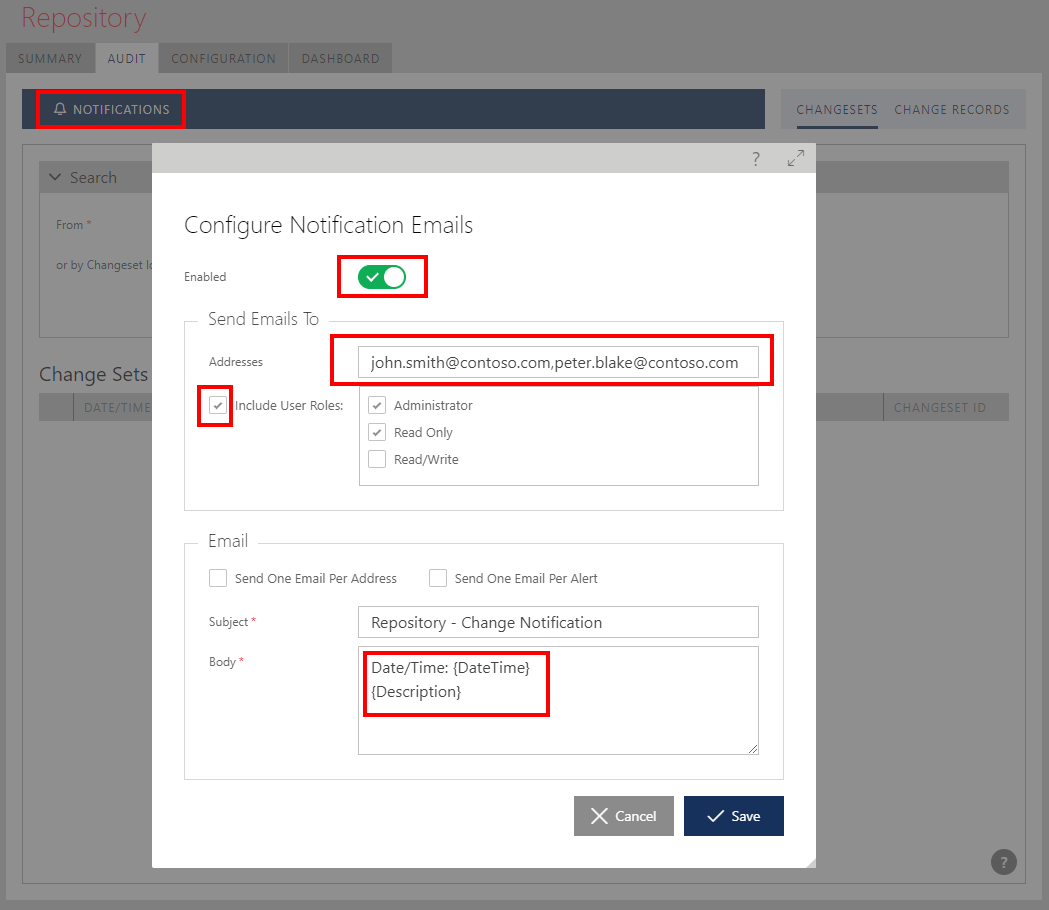
You can assign all Sentinet users that have access to the object selected in the Repository tree to automatically receive notification emails, and/or add individual email subscribers.
The body of the notification emails is customizable through the email template entered in the Body field. You can configure email template with any of the following template tokens:
| {Id} | alert database identifier |
| {TypeId} | alert type database identifier |
| {TypeName} | alert type friendly name |
| {Subtype} | alert subtype |
| {SourceTypeId} | alert source type database identifier |
| {SourceTypeName} | alert source type friendly name |
| {Description} | alert description |
| {DateTime} | alert generation time in the reporting time zone |
| {DateTimeUtc} | alert generation time in UTC |
| {Data} | alert custom (source specific) properties serialized to XML |
| {Data.EntityId} | database identifier of the changed major entity |
| {Data.EntityKey} | unique key identifier of the changed major entity |
| {Data.EntityType} | changed major entity type |
| {Data.FriendlyEntityType} | changed major entity type friendly name |
| {Data.FriendlyEntityName} | friendly name of the changed major entity |
| {Data.ChangeSetId} | database identifier of the change set |
| {Data.ChangeSetDescription} | changeset description |
| {Data.ChangeType} | change type (1,2,4) |
| {Data.FriendlyChangeType} | change type friendly name ('created','updated','deleted') |
Note
Change notifications will only be sent if Repository Web Services Application is configured with a Mail Server for outgoing email notifications (see Sentinet Installation Guide for more details).