User Accounts
Developer Portal User Accounts are not the same as Sentinet User Accounts. Developer Portal Users are members of the Developer Portal Consumer accounts. They are created to access Developer Portal only. Sentinet Users manage Sentinet only from the Sentinet Administrative Console.
When a Consumer account is created from the Developer Portal through a self-registration process, Consumer account automatically gets its first User account.
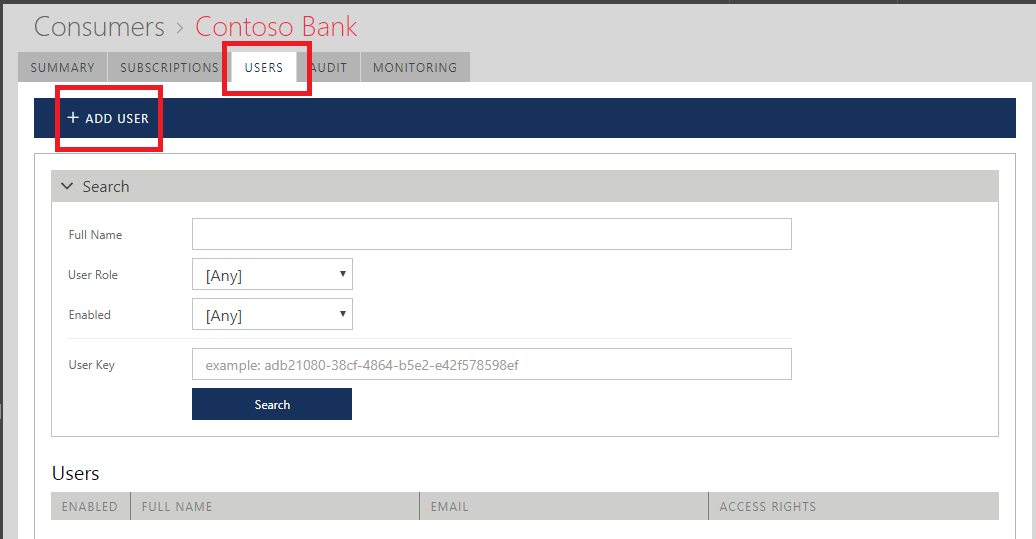
When Consumer account is created from the Sentinet Administrative Console (described in this chapter), Consumer account does not get any User accounts. At least one User account must be created from the USERS tabs of a Consumer screen in order for Consumer account to be accessible later from the Developer Portal.
Click + ADD USER toolbar button to add new user account to a Consumer account.
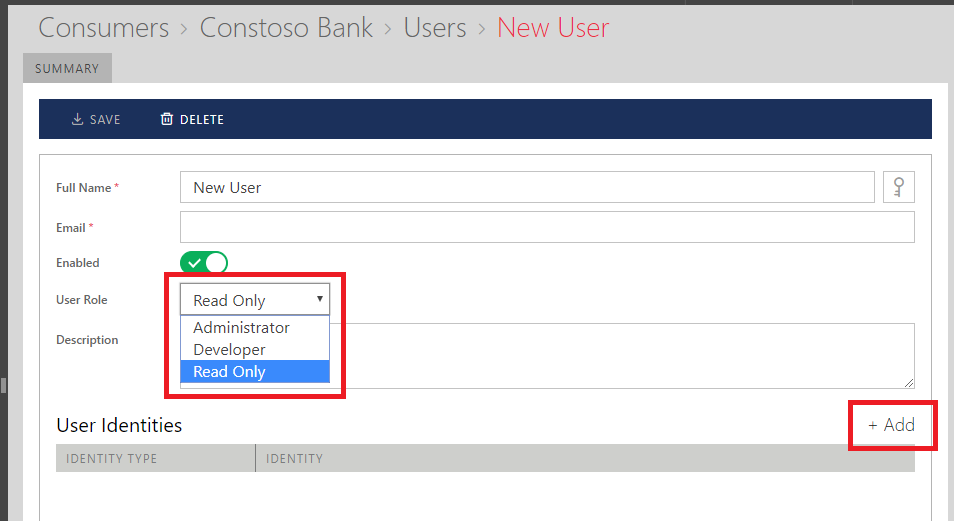
Assign to a new User account:
User-friendly Full Name.
User Email address.
Enabled flag, which controls permanent or temporary enablement of a User account.
User Role -- user role assigned to a new Developer Portal User account created for this Consumer account.
a. Administrator -- user account has read / write access to all account management features.
b. Developer-- user account has read / write access to all account management features except it cannot view or manage other user accounts.
c. Read Only -- user account has read only access to all account features except it cannot view other user accounts.
Optional Description.
Click + Add button above User Identities table to add specific identity to a new User account.
Follow Add Identity Wizard to add Username/Password type of identity (similar process is described in the Managing Sentinet Users chapter for the Sentinet Administrative Console User accounts).
Important
Current Sentinet version supports only Username/Password type of identity for the Developer Portal user accounts. Other types of identities can be added in this version, but will be supported in the future Sentinet versions.