Appendix A. Publishing and Accessing Sentinet Remote Management API
Sentinet Remote Management API can be used by third party applications, scripts and tools to augment Sentinet and to leverage its complete functionality outside of the Sentinet Administrative console. Sentinet Management can be accessed as both SOAP service and as a REST API.
SOAP Service
By default, the Sentinet Management SOAP API (SOAP Web Service) does not emit its metadata, because of security best practices. Sentinet Administrator can enable metadata HTTP Get and HTTPS Get access to this SOAP Web Service's WSDL by modifying Repository web.config file.
Uncomment serviceMetadata section in web.config file
…
<serviceBehaviors>
  <behavior name="serviceBehavior">
      …
      <!--
      <serviceMetadata httpGetEnabled="true" httpsGetEnabled="true" />
      -->
  </behavior>
…
Sentinet SOAP Web Service API metadata is now available at the following default address:
https://[machine]/Sentinet/RepositoryService.svc?wsdl.
Sentinet Management SOAP Service can now be registered in the Sentinet Repository just like any other service, and observed for its interfaces, operations, endpoints and endpoint policies (bindings).
Sentinet Management SOAP defines two interfaces, ConfigurationService and RepositoryService.
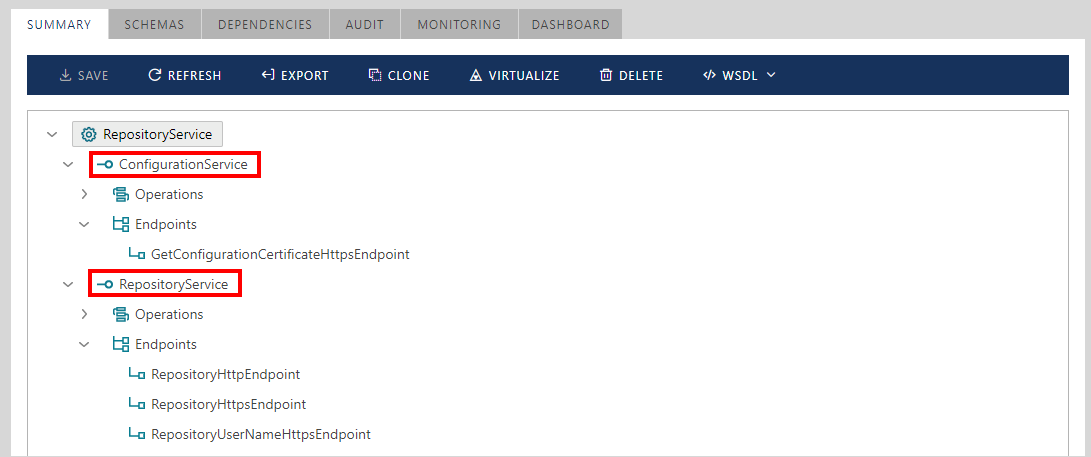
ConfigurationService interface is for the Sentinet Nodes to call, and is not typically used by extensibility applications or scripts.
RepositoryService interface is the one that is most often used by extensibility applications.
RepositoryService defines three endpoints:
RepositoryHttpEndpoint and RepositoryHttpsEndpoint are for Sentinet Administrative Console to use. These endpoints leverage ASP.NET cookie-based sessions. RepositoryHttpEndpoint is not available by default, because the Sentinet Repository Web Application is configured to allow only SSL connections. Should the SSL requirement be dropped, then this endpoint will automatically be available.
RepositoryUserNameHttpsEndpoint is used by the Sentinet Node Configuration Wizard and is most likely to be used by external applications that leverage the Sentinet SOAP Web Service API. The endpoint is configured with SSL and message-level Username/Password security token requirements.
Note
Repository Application web.config file can be modified, and additional endpoints can be added to the RepositoryService.
Example of the service operations most often used by the external applications are Find[...] operations that allow searching the Repository for any of its entities by using multiple criteria.
![List of Find[...] operations](../../images/User-Guide/user_guide325.png)
Sentinet installation package is shipped with Nevatech.Vsb.Samples.SearchEndpoints, a sample Visual Studio project that demonstrates the use of Sentinet SOAP Web Service API to search for service endpoints and their associated properties in the Sentinet Repository.
REST API
By default, the Sentinet Management REST API does not emit its documentation, because of security best practices. The Sentinet administrator can enable publishing REST API help pages by modifying the Repository Web Application web.config file. Find in the web.config file webEndpointBehavior and change its helpEnabled attribute value to true as shown below:
<endpointBehaviors>
   …
   <behavior name="webEndpointBehavior">
      <extendedWebHttp automaticFormatSelectionEnabled="true" defaultBodyStyle="Bare"
        faultExceptionEnabled="true" defaultOutgoingResponseFormat="Json"
        defaultOutgoingRequestFormat="Json" helpEnabled="true"
        useSimpleDictionaryFormat="true" jsonDateTimeFormat="yyyy-MM-ddTHH:mm:ss.fffZ" />
   </behavior>
</endpointBehaviors>
To see Sentinet Management REST API simple documentation, change your browser URL to http://sentinetserver/Sentinet/RepositoryService.svc/help, where sentinetserver and Sentinet virtual directory may have to be changed to your specific machine name and Sentinet virtual directory. The browser will display Sentinet REST API help page as shown below.
The browser will display Sentinet REST API help page as shown below.
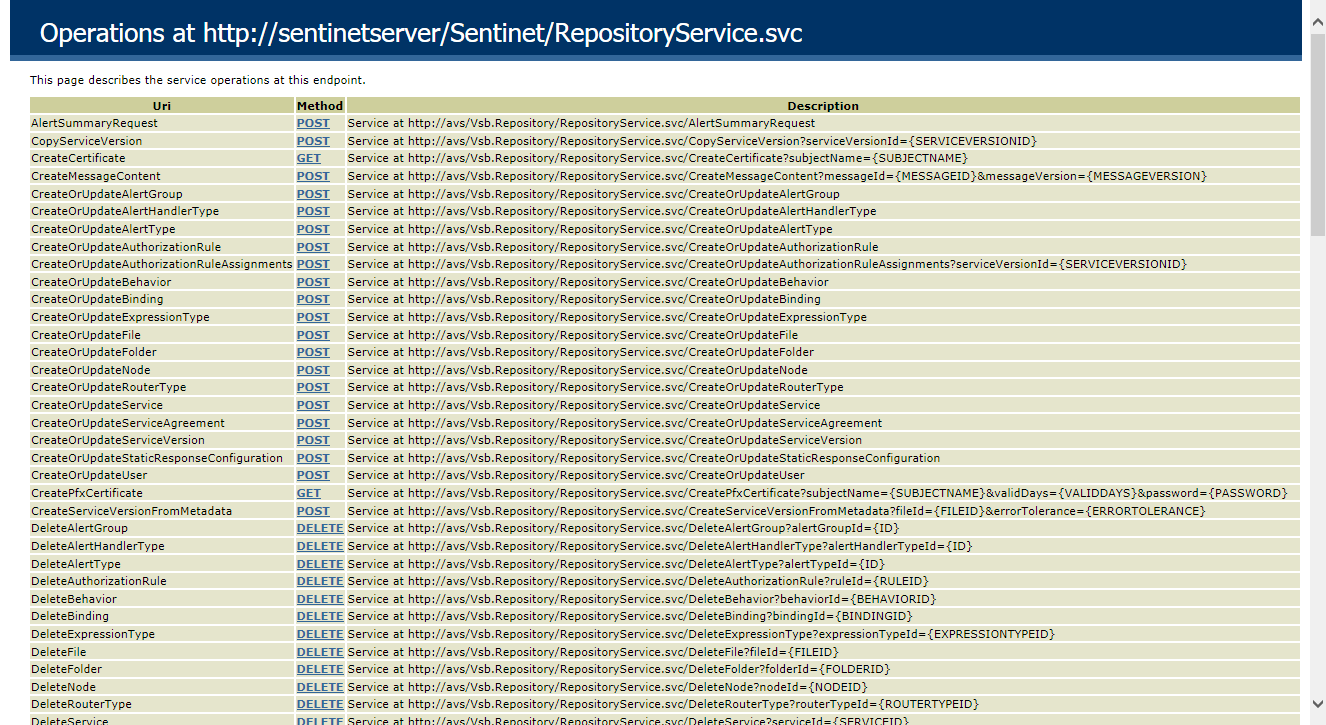
You can click on operation's Method link to learn more about specific operation and its message formats.
Sentinet REST API supports both XML and JSON formats (see Microsoft documentation for more details on how to control WCF Web HTTP formatting https://msdn.microsoft.com/en-us/library/ee476510(v=vs.110).aspx).
Sentinet Management REST API is enabled with secured access, which means only authenticated and authorized calls can be serviced by this API. This API uses the same security model as the Sentinet Administrative Console - the HTTP cookie-based secure sessions. To support the REST API out-of-browser, the Sentinet API includes a LogOn operation that returns true with a successful login and false with an unsuccessful login. Once login is successful, the Set-Cookie HTTP header from the Login response must be captured and used in all subsequent calls to the Sentinet REST API. Sample code snippet below shows how to call the LogOn operation and then GetSystemInfo operation. Note, that the code below shows two alternative ways to call LogOn operation, via HTTP GET and HTTP POST methods.
using System;
using System.Globalization;
using System.Net;
using System.Web;

namespace Nevatech.Vsb.Samples.RestApi
{
    internal class Program
    {
       private static void Main(string[] args)
        {
           var serviceUrl = "https://sentinetserver/Sentinet/RepositoryService.svc";
           var userName = "Administrator";
           var password = "password";

           using (var client = new HttpClient())
           {
               // Create log on request using GET method
               // Note that query parameters must be encoded
               var authRequest = new HttpRequestMessage(HttpMethod.Get,
               string.Format(CultureInfo.InvariantCulture, "{0}/LogOn?userName={1}&password={2}",
               serviceUrl, HttpUtility.UrlEncode(userName), HttpUtility.UrlEncode(password)));

               /* Create log on request using POST method
               var authRequest = new HttpRequestMessage(HttpMethod.Post,
               string.Format(CultureInfo.InvariantCulture, "{0}/LogOn", serviceUrl))
               {
                   Content = new StringContent(string.Format
                   (CultureInfo.InvariantCulture,
                   "{{\"UserName\":\"{0}\",\"Password\":\"{1}\"}}",
                   userName, password), Encoding.UTF8, "application/json")
               };*/

               // Send request and get authentication result string
               var authResult = client.SendAsync(authRequest).Result.Content.ReadAsStringAsync().Result;

               // If authentication was successful, get Sentinet System Info
               // Note that using the same HttpClient instance automatically handles session cookie
               if (string.Equals(authResult, "true", StringComparison.OrdinalIgnoreCase))
               {
                   var result = client.GetStringAsync(string.Format(CultureInfo.InvariantCulture,
                   "{0}/GetSystemInfo", serviceUrl)).Result;
               }
           }
       }
   }
}
Sentinet installation package is shipped with Nevatech.Vsb.Samples.OpenApi, a sample Visual Studio project that demonstrates how to use Sentinet RESTful Management API with a generic HTTP client to programmatically register (create) a RESTful physical service from an OpenAPI (Swagger) document in the Sentinet Repository and then virtualize it.