Samples
To install Sentinet samples run the Sentinet installation package and select either Complete Setup Type, or Custom Setup Type with Samples installation feature enabled.
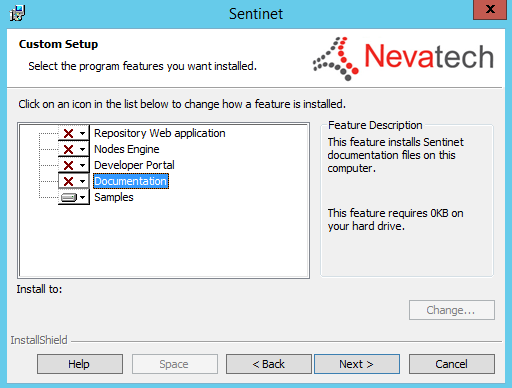
Samples are installed in the Samples sub-folder in the root of the installation folder. (Default folder location: C:\Program Files\Nevatech\Sentinet\Samples).
| Sample | Description |
|---|---|
|
Installation folder |
Sample scripts and configuration template files for automated deployments (see Appendix A in this document for more details). |
|
Visual Studio 2015 Solution |
Visual Studio 2015 solution with nine sample projects: 1. CustomerSearchService - Compiled sample of the WCF services application that can host sample REST APIs and SOAP services and can be used to quickly exercise various Sentinet features. 2. CustomAccessRuleExpression - Sentinet Custom Access Rule Expression component. 3. CustomAlertHandler - Sentinet Custom Alert Handler component. 4. CustomErrorHandler – Custom errors processing when Sentinet Nodes generate internal errors. 5. CustomRouter - Sentinet Custom Router component. 6. CustomTask - Sentinet Custom Agent Service Tasks. 7. CustomMessagePipelineComponent - Sentinet Custom Message Processing Pipeline component. 8. CustomMonitoringFilter – Sentinet Custom Monitoring Filters. 9. SearchEndpoints - Sentinet SOAP Web Service API sample that shows how to search Sentinet Repository for service endpoints (see Sentinet User Guide for code snippets that demonstrate how to use Sentinet REST API). 10. Automation - Sample project that shows how to use Sentinet Management SOAP API for automation. 11. OpenApi - Sample project that shows how to use Sentinet Management REST API for automation. 12. Azure – sample ARM template and parameters files for Sentinet automated deployments in Microsoft Azure platform. |
Please refer to Sentinet User Guide document for detailed description of the Sentinet samples.