Prerequisites
Prerequisites require only configuration of Windows OS. Prerequisites can be installed by configuring Windows OS either interactively or by using PowerShell script.
Important
.NET Framework 4.8 Runtime must be installed before installation of all other Windows OS prerequisites.
The easiest way to ensure prerequisites are met is to launch PowerShell script installed as part of the Sentinet Samples installation feature and located by default in C:\Program Files\Nevatech6\Sentinet\Samples\Installation\Scripts folder. Run as administrator Prerequisites.cmd from command prompt, which launches Prerequisites.ps1 script.
The rest of this chapter describes User Interactive configuration of Windows OS with the required prerequisites for each individual Sentinet component.
Repository Web Application
.NET Framework version 4.8.
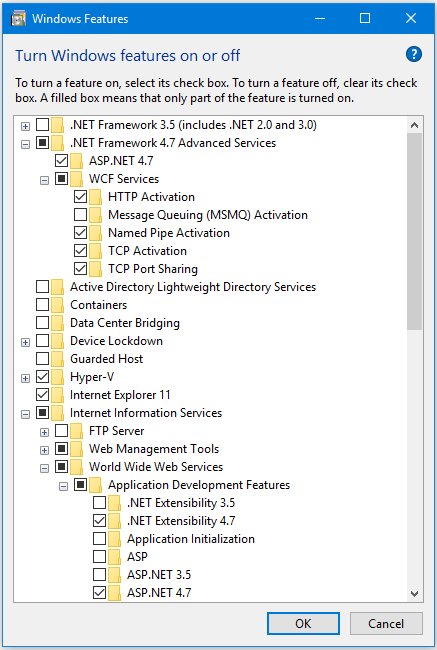
Enabled Web Server Role with IIS Management Console on a Windows server. Enabled Internet Information Services feature on a Windows server or a Windows 10 machine.
Enabled .NET and ASP.NET with IIS server.
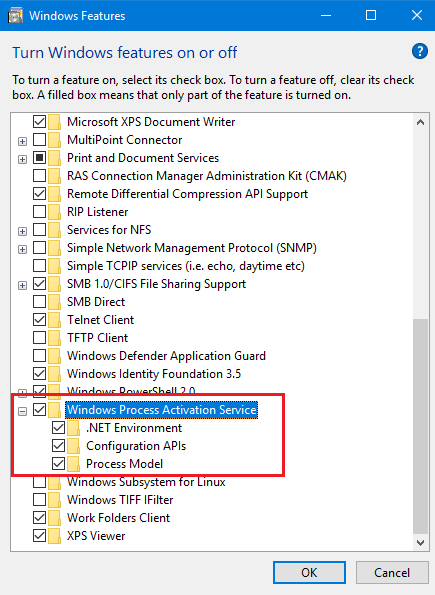
Enabled Windows Activation Services (or Windows Process Activation Service on some OS) feature enabled.
WCF Activation feature enabled with at least HTTP Activation and Named Pipe Activation.
- Connection to existing Microsoft SQL Server 2008, 2012, 2014, 2016, 2017 or 2019.
* Recommended: Microsoft SQL Server with installed Full-Text Search feature.
Developer Portal Web Application
The same prerequisites as for the Repository Web Application above, except that Named Pipe Activation with WCF Activation is not required.
Sentinet Nodes
.NET Framework version 4.8.
Enabled Web Server Role with IIS Management Console on a Windows server. Enabled Internet Information Services feature on a Windows server and a Windows 10 machine.
Enabled .NET and ASP.NET with IIS server.
Enabled Windows Activation Services (or Windows Process Activation Service on some OS) feature enabled.
WCF Activation feature enabled with at least HTTP Activation and Named Pipe Activation.
Sentinet Administrative Console
Supported browsers for the Sentinet Administrative Console:
Google Chrome (latest version) - recommended for better User Experience and performance
Firefox (latest version)
Microsoft Edge (latest version)
Sentinet Developer Portal Console
Supported browsers for the Sentinet Developer Portal Console:
Google Chrome (latest version) - recommended for better User Experience and performance
Firefox (latest version)
Microsoft Edge (latest version)